
How to See All Your Businesses on One Screen
If you run more than one business, here's what a single morning screen can show you, and how owners set one up.

If you run more than one business, you probably start the day by opening tabs. Payments for one business, the booking calendar for another, an inbox for each, and a shop dashboard somewhere in the middle. Each tool works fine on its own. The trouble is that none of them show you the whole picture.
A Today page fixes that. It's one screen you open each morning that pulls from the tools you already use and shows every business side by side.
I see this a lot. A doctor with a clinic and an online shop. A salon owner with a product line. A realtor who also manages rentals. A nurse with a business on the side. Different businesses, same morning routine of checking six places before coffee.
What a Today page shows each morning
A good Today page answers three questions for every business you run:
- What came in? Money in since yesterday and so far this month, for each business on its own and all together.
- What's booked? Today's appointments, calls and orders, in one list with the business named next to each one.
- What's waiting on you? The messages, approvals and follow ups that need you, sorted so the most important one is on top.
Every number comes from a real account. Your payment processor, your booking tool, your shop and your inbox feed it, so the screen changes as your day does. Nobody types the numbers in by hand.
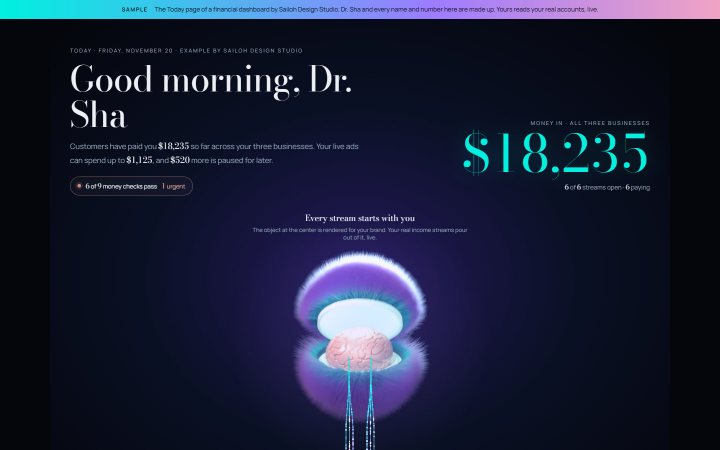
A sample: Dr. Sha's Today page
To show what this looks like, we built a sample for a made up owner, Dr. Sha, who runs a practice, a clinic and an online shop. Dr. Sha isn't a real person, and every name and number on the sample is invented. It's labeled Sample at the top.
Here's what you'd notice on it:
- One greeting and one total at the top, so you know where things stand in two seconds.
- Each business shown as its own stream, so you can see which one had a busy day.
- A short list of what's waiting, with a button on each item, so you act right from the screen.
Your own Today page is designed around your business. Only you see your real numbers, behind your own sign in.
How owners set one up
- List what you check each morning. Write down every app and account you open before work. That list is the blueprint.
- Pick the three answers you care about most. For most owners it's money in, what's booked and what's waiting. Some add ad spend or reviews.
- Connect the accounts once. The Today page reads from them. You keep using each tool exactly the way you do now.
- Use it for a week, then trim. Anything you never look at comes off. Anything you keep checking elsewhere goes on.
You can stitch something together yourself with spreadsheets and exports. It works for a while, but it goes stale the day you stop updating it. A Today page that reads your accounts for you stays current.
Questions owners ask
Can one dashboard show three businesses? Yes. Each business shows as its own section, and the top of the screen adds them together. You can see one business at a time or all of them at once.
Do I own it? Yes. You own everything built for you, including the Today page and its content.
Do I have to change the tools I use? No. The Today page reads from the accounts you already have, like your payments, bookings, shop and email.
Who sees my numbers? Only you, and anyone you choose to add. The page sits behind your own sign in.
Want to see your businesses on one screen?
Founder Erica Khalil, BSN, RN, is a digital design architect. We build SaaS companies, apps, websites, business overview dashboards, and done-for-you Claude services.
Book a free Vision Call: https://calendly.com/contact-sailohdesignstudio/30min. Tell me which businesses you run and what you check each morning, and I'll show you what your Today page could look like.